The DexsAlertBot Chrome Extension
The same alerts the bot sends to Telegram, shown inside your browser at the same moment — on top of the platform you are already trading on. Free, and it never asks for your wallet.
Desktop Chrome · needs a DexsAlertBot account on Telegram · no signup, no wallet connection
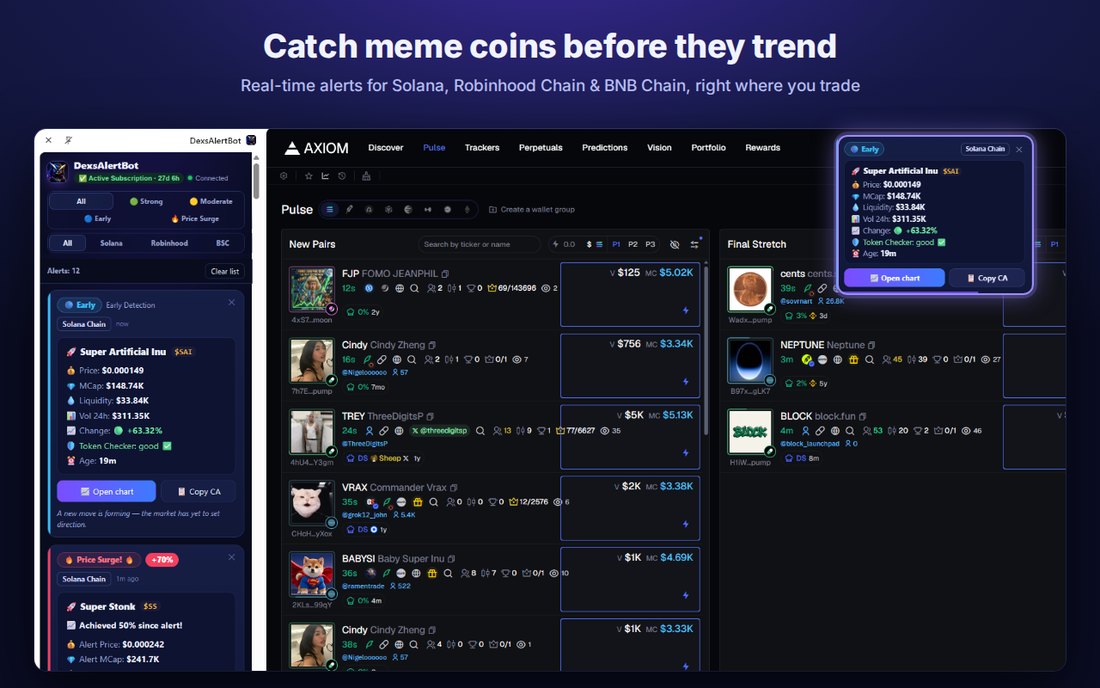
Your alerts, where your eyes already are
The bot decides everything — what qualifies, which level, and your daily limits. The extension only displays what the bot sends, at the same instant Telegram receives it.
The same alert, the same moment
Not a copy and not a delay. The same alert reaches Telegram and the browser together, and counts once against your daily limit — never twice.
Three levels, three networks
🟢 Strong, 🟡 Moderate and 🔵 Early on Solana, Robinhood Chain and BNB Chain — the same scale you already read in the bot.
Price surge alerts too
Follow-up alerts on tokens you were already alerted about: the alert price, the current price, and the real multiplier since then.
Linked in four steps
Two minutes, once. No email, no password, and no wallet at any point.
Install from the Chrome Web Store
Open the store listing and press Add to Chrome. Desktop Chrome 116 or newer.
Open the bot on Telegram
Send /start to @DexsAlertBot. If you already use the bot, you are already set.
Ask for a link code
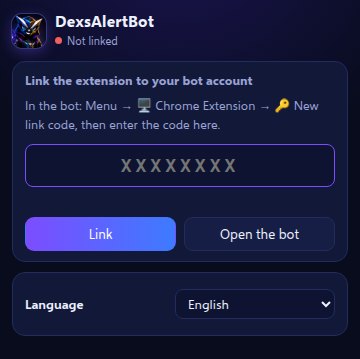
In the bot open 🖥️ Chrome Extension — from the menu buttons or ☰ Menu → /extension — then tap 🔑 New link code.
Enter the code in the extension
Click the extension icon in Chrome's toolbar, type the code, press Link. The bot confirms it in Telegram.
About the code
The code is 8 characters, works once, and expires after 10 minutes. If it stops working, just request a new one — there is no limit on how many you can generate.
One account, one browser
Linking a new browser automatically unlinks the previous one. You can also unlink yourself at any time — from the extension with Unlink this browser, or from the bot with ⛔ Unlink the extension.
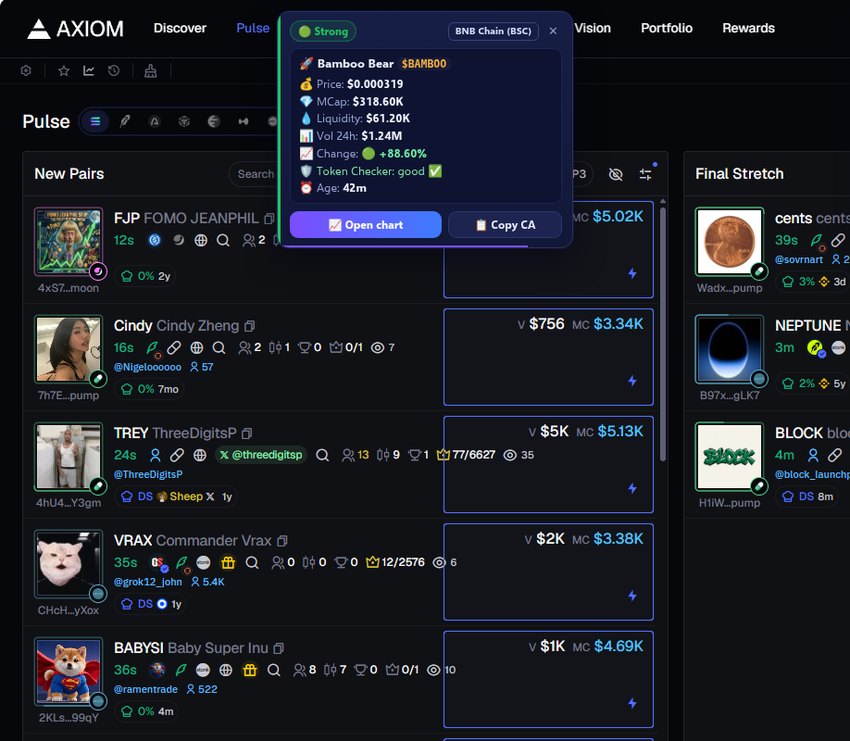
An alert that does not make you switch windows
The alert appears over whatever page you are on, carrying the same fields as the Telegram message: network, price, market cap, liquidity, volume, age, the signal level with its reason, and the Check Token result.
Two buttons do the work: copy the contract address, or open the chart on the platform you trade on. You choose where it appears — top centre, top right, top left, or off entirely — and how long it stays: 3, 5 or 10 seconds.
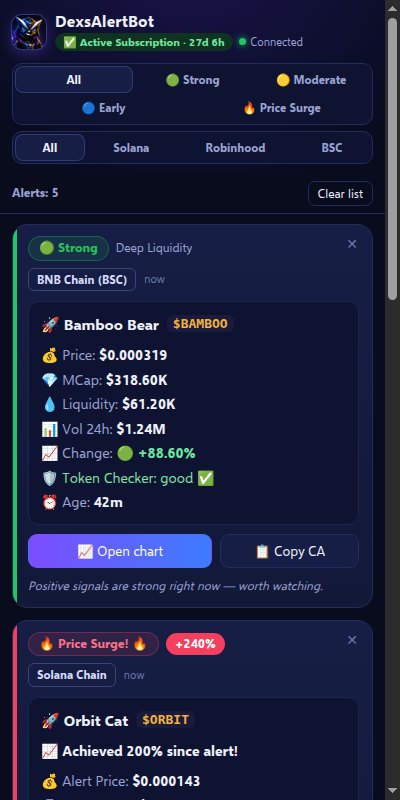
A panel that stays open while you trade
Your recent alerts in one column, up to 150 of them, each card labelled with its network — Solana Chain, Robinhood Chain or BNB Chain (BSC). A bar above the list shows the count and a Clear list button, and clearing asks for a second click so one stray tap never wipes the list.
- 🔎Filters for subscribersFilter by level — Strong, Moderate, Early, Price Surge — and by network. On the free plan that space shows your remaining daily quota instead.
- 🔔System notificationsWhen Chrome is not in front, the alert arrives as a desktop notification: in background only, always, or off.
- 🔊Separate soundsOne sound for new alerts and another for price surges, each chosen from seven or switched off on its own, with a volume control.
One click from alert to chart
Auto mode recognises the trading site you already have open and opens the chart there. You can also pin one platform permanently.
| Platform | Solana | Robinhood Chain | BNB Chain |
|---|---|---|---|
| Axiom | ✅ | ✅ | ✅ |
| GMGN | ✅ | ✅ | ✅ |
| DexScreener | ✅ | ✅ | ✅ |
| Terminal (Padre) | ✅ | — | — |
| Photon | ✅ | — | — |
| FOMO | ✅ | — | — |
| BullX | ✅ | — | — |
| pump.fun | ✅ | — | — |
| Birdeye | ✅ | — | — |
If the platform you pinned does not cover the token's network, the chart opens on that network's default instead — Axiom for Solana, GMGN for Robinhood Chain and BNB Chain.
The extension follows your plan in the bot
There is nothing to buy here. The extension itself is free, and it simply reflects whether your bot account is Free or Premium.
| Free | Premium | |
|---|---|---|
| Alerts | Daily limit per level, shared with Telegram | No limits |
| Price surge alerts | ✅ | ✅ |
| Panel filters | Shows your remaining quota instead | ✅ |
| Notification settings | Subscribers only | ✅ |
The Subscribe button inside the extension simply opens the bot. Payment happens only inside the bot — never in the extension, and never on this website. See the plans →
What it cannot do
An alert tool has no business touching your funds, and this one is built so that it cannot.
No wallet, ever
It never asks for a wallet, a private key, a seed phrase or a signature. It cannot move funds and it places no trades.
It does not read your pages
On a page it does two things only: draws the alert over it, and reads the site's address so Auto mode knows which platform's chart to open.
One connection
The extension talks to a single address — the alert server at dexsalertbot.com — and nowhere else.
Chrome lists the permissions an extension requests before you install it. Here is what each one is for: storage saves your settings and recent alerts on your own computer · notifications for the desktop notification when Chrome is not in front · sidePanel for the alerts panel · offscreen to play the alert sounds · alarms to keep the connection to the alert server alive · clipboardWrite for the copy-contract button · scripting and site access to draw the alert over the page you are on and to detect the trading platform for Auto mode.
Extension questions
Is the extension free?
Yes. The extension costs nothing and follows your plan inside the bot: the free plan has daily limits per level, Premium has none. There is no separate purchase and no payment inside the extension.
Do I need to connect a wallet?
No, and you never will. The extension and the bot never ask for a wallet, a private key, a seed phrase or a signature, and neither can move funds or place a trade. The only thing you connect is your Telegram account, through a one-time code.
Does it work on my phone?
No. It is a desktop Chrome extension, because Chrome on mobile does not support extensions. On a phone, use the Telegram bot — it sends exactly the same alerts.
Will I get every alert twice now?
You see it in both places, but it is one alert, not two. The bot sends it once; Telegram and the browser display the same one, and it counts once against your daily limit.
My link code does not work
A code is one-time and expires after 10 minutes, so an old code will always fail. Open 🖥️ Chrome Extension in the bot and tap 🔑 New link code for a fresh one. Check too that you pasted all 8 characters with no space before or after.
Can I use it on two computers?
One account links one browser. Linking a new browser unlinks the previous one automatically, and the bot tells you when that happens.
Does it work in Edge, Brave or Opera?
It is published for Google Chrome. Other Chromium browsers that can install from the Chrome Web Store may work, but they are not officially tested and we cannot promise they will behave identically.
Which networks does it cover?
All three the bot covers: Solana, Robinhood Chain and BNB Chain. Each alert card is labelled with the network it came from, and subscribers can filter the panel by network.
Add it to Chrome
Free, no wallet, no signup — install it, link it with one code, and the next alert arrives in your browser.
Add to Chrome →⚠️ Informational alerts only — not financial advice. Always do your own research (DYOR). Trading meme coins carries high risk.